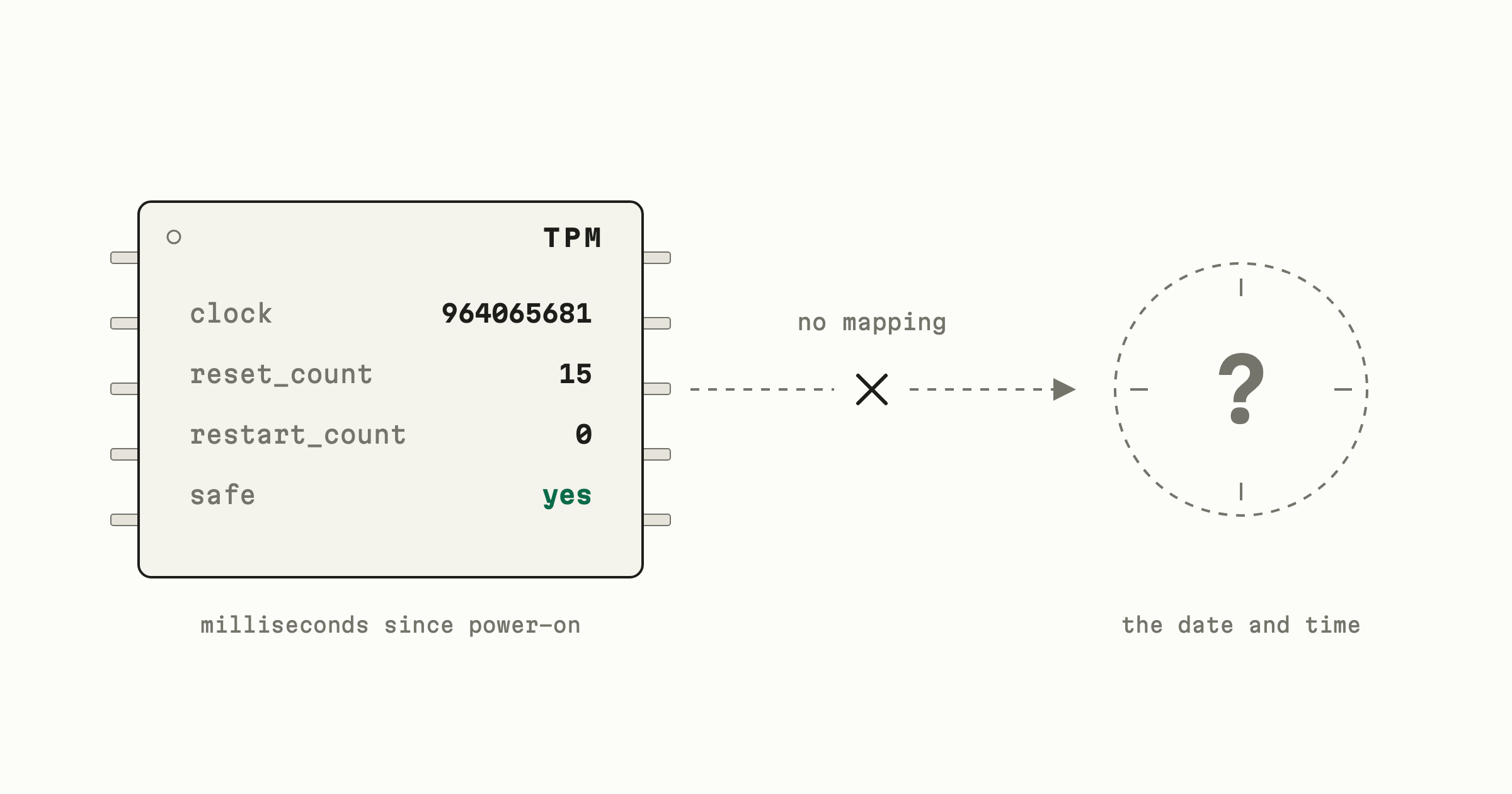
I have a confidential VM running for some attestation work. It has a virtual
TPM, which reports its manufacturer as GOOG. I was poking at it and ran
tpm2_readclock, expecting a timestamp somewhere in there.
$ sudo tpm2_readclock
time: 964062646
clock_info:
  clock: 964065681
  reset_count: 15
  restart_count: 0
  safe: yes
No date. I went looking for why, assuming I’d missed a command.
what a TPM is
A TPM is a small, slow processor that holds keys and won’t give them back. You can ask it to sign something. You can’t ask it for the key.
It also keeps registers called PCRs. You can’t write a PCR, only extend it: the chip replaces the register with a hash of the old value plus whatever you fed in. Firmware extends the bootloader’s measurement into one, the bootloader extends the kernel’s, and so on. By the time you’re at a login prompt those registers are a summary of everything that ran, and the TPM will sign a statement saying what they hold. That signed statement is a quote, and it’s the primitive under remote attestation, measured boot, and disk keys that only unlock on one machine.
the five numbers
This is tpm2-tools 5.6. The man page defines all of these, and it’s worth reading it before you guess at them like I did.
time is milliseconds the TPM has been powered on. It reads 964062646, so
about 11.2 days. The OS reports 964040 seconds of uptime, which is 22 seconds
less. That gap is firmware: the TPM was powered and counting while the
platform came up, before the kernel started counting uptime.
clock is also milliseconds powered on, but since the last TPM2_Clear
rather than since the last boot. Here it’s 3035 ms ahead of time, so this
chip was powered for three seconds before the current boot and has been up
ever since.
reset_count is 15, meaning fifteen TPM Resets since that same TPM2_Clear.
All fifteen fit inside those three seconds, presumably while the VM image was
being built.
restart_count is 0. It counts TPM2_Shutdown and _TPM_Hash_Start since
the last reset, so it tracks a different event: coming back with saved state
rather than starting fresh. On a VM that has never been suspended there is
nothing for it to count.
safe is the one I find interesting. The man page defines it as: no value of
Clock greater than the current value has previously been reported by the TPM.
So it isn’t a claim that the clock is accurate. It’s a claim that the chip has
never handed out a larger number than the one you’re looking at now. I have
not managed to find the exact conditions under which it clears, and I would
rather say that than guess.
What I can’t get out of any of it is when. Fifteen resets, three seconds, eleven days, and no way to place any of it on a calendar.
why there’s no date
A clock that survives power-off needs a battery. Your board has one and it powers a clock chip, but that chip isn’t the TPM.
The reason that matters: the TPM only vouches for things it can check itself. It can check its own registers because nothing else can write them. It can’t check a clock chip on the other side of the board.
So say it read the board clock and signed that. An attacker sets the clock and the TPM signs it. The TPM has learned nothing, and the attacker’s number now carries a signature the verifier trusts.
There’s a cost argument too, and it probably did more of the deciding. TPMs got everywhere by being cheap enough to put on every board. Batteries die, sockets corrode, and both generate warranty claims.
What you get instead is reset_count and safe. Neither makes the counter
trustworthy as time. They tell you the counter isn’t continuous and leave the
verifier to decide what to do about that.
a real clock wouldn’t help anyway
This is the part I didn’t expect.
Say the chip knew the true time and nobody could fool it. A server wants to know your laptop booted software it approves of. It asks, the TPM signs a statement about its registers, the server checks the signature.
The server’s problem was never what time it is. It’s whether this statement is about the machine now, or a recording of a healthy machine from six months ago that someone kept.
The fix doesn’t involve clocks. The server sends a random number with the question, and the TPM signs that number along with the registers. An answer containing it must have been produced after the question, because nobody could have guessed it. That’s a nonce.
Now try it with time instead. The TPM signs a timestamp, the server compares it against its own clock, so the two clocks have to agree, so you need a sync protocol, and the sync protocol has to prove its own messages aren’t replays, which is where you started.
RFC 9334 section 10 lists three ways to get freshness: explicit timekeeping with synchronised clocks, implicit timekeeping with nonces, and implicit timekeeping with epoch IDs. It is blunt about why the first one is often unavailable:
in many TEEs today, a clock is only available outside the TEE; thus, it cannot be trusted by the TEE
Which is the same argument as the board-level one above, one layer up. The machine I started on is a TEE.
what the counter is actually for
The first use is reset detection. That clock info travels inside every quote, so if you hold two quotes from the same machine you can diff the reset counts. You learn nothing about when either was taken. You do learn whether the machine rebooted in between, which is sometimes the question you had.
The number in a quote is usually not the reset count. If the signing key is
not in the endorsement or platform hierarchy, the TPM adds a constant to
resetCount and restartCount before signing. That offset is derived from
the signing key’s qualified name, so it is the same every time that key signs
and different for every other key. Two quotes from one key still differ by the
right amount. Two quotes from different keys cannot be compared at all.
clock, time and safe go out untouched. The point is privacy: you detect
that the counter moved without learning the machine’s boot history.
The second is local policy. You can bind a key to these values so the chip
refuses to use it unless the counter is in a range you set, with
tpm2_policycountertimer.
The chip evaluates that policy itself, so nothing outside it has to agree
about what time it is. This only works because
tpm2_setclock
won’t go backwards:
$ CURRENT=$(sudo tpm2_readclock | awk '/clock:/ {print $2}')
$ sudo tpm2_setclock $((CURRENT - 100000))
ERROR:esys:src/tss2-esys/api/Esys_ClockSet.c:100:Esys_ClockSet() Esys Finish ErrorCode (0x000001c4)
ERROR: Esys_ClockSet(0x1C4) - tpm:parameter(1):value is out of range or is not correct for the context
ERROR: Unable to run tpm2_setclock
If you could rewind it, any policy written against it would be worthless.
The comparison happens when you build the session, not when you use the key.
TPM2_PolicyCounterTimer checks the value and, if it passes, folds the check
into the session’s policy digest. Every command after that verifies the digest
and nothing else. A session authorised at 16:59 still works at 17:01, for as
long as the session lives.
So the answer to my original question is that I hadn’t missed a command. If you need to know when something happened, the TPM isn’t where that comes from, and you should be reaching for a nonce anyway.
Working notes. If something here is wrong, tell me.